Loss Recovery Calculator -
1. Use 10-20% of Total capital per day
2. Set a fix risk per day
3. Fixed Position size every day
4. Fixed Number of trades per day
5. ONE SINGLE STRATEGY ONLY!!!!
For example, if I have lost 10 lacs - I won't look to recover it in 2 days.
I will break it into SO Parts.
So 20000 profit and 20000 loss per day.
Now out of 100 trading sessions, if I win 70% and lose 30%, still I can recover the whole 10 lacs in 6 months.
This is how you need to calculate.
This is a very good example.
Wednesday, 16 November 2022
Loss Recovery Calculator

Thursday, 24 December 2020
Is there any perfect formula or method to earn a profit from intraday trading in the share market?
Many intraday traders lose money because they are unable to identify the right trade opportunities. Besides, their emotions will take over in the live market, and they do many random trades that will erode their capital.
Usually, a good intraday trade opportunity can come in any form. It is highly essential to know all the trading types, to differentiate those trading types, identifying the right trading type in the live market on any particular day, and to maintain a balanced mind in all the situations is the key to become successful in intraday trading.
Below are the important trading types which can occur on any trading day:
- Trend Continuation
- Trend Reversal
- Breakout/Breakdown
- False Breakout/False Breakdown
- Random price auction
1 - Trend continuation

When you get a trade opportunity in the direction of the trend with a good risk-reward setup, it can be recognized as Trend continuation or Trend following trading technique. Usually, these trade opportunities are safer but result in small to medium risk-reward trades.
2- Trend Reversal
When you get a trade opportunity in the opposite direction of the trend, it can be recognized as a Trend Reversal trading technique. Usually, these trade opportunities carry more risk but result in good risk-reward trades.

3- Breakout trading concept

If you look at the above image price consolidated within a range from 4-Dec to 12-Dec and on 13th Dec it breaks out from the range and gives a big move on the upside. Only the ‘Breakout’ trading technique gives positive results on this day, and any other trading technique will fail on this day.
4- False Breakout trading concept

False Breakout is a tricky candidate to analyze. Initially, it looks like a beautiful Breakout trade opportunity, and once you opt for a breakout trade, the price moves in the opposite direction. If you look at the above image, initially the price showed strength, and when we think it is ready to break on the upside, it faded that move and moved in the opposite direction.
Conclusion:
Every day cannot be traded with the same strategy. An intraday trader must have the clarity that an opportunity can come on any trading technique and he/she should be ready to opt for the right trade opportunity.
Market Profile concept gives more clarity on how to identify and differentiate these trading opportunities very early using “Open-Types” and “Day-Structure” concepts.
A detailed study of the market profile will help and provides an edge in intraday trading.
I hope this detailed explanation helps!
Wednesday, 4 November 2020
Redis Object Caching and Fast CGI Page Caching
Object Cache
An object cache stores database query results so that instead of running the query again the next time the results are needed, the results are served from the cache. This greatly improves the performance of WordPress as there is no longer a need to query the database for every piece of data required to return a response.
Redis is the latest and greatest when it comes to object caching. However, popular alternatives include Memcache and Memcached.
To install Redis, issue the following commands.
sudo apt install redis-server
sudo service php7.4-fpm restart
In order for WordPress to use Redis as an object cache, you need to install a Redis object cache plugin. Redis Object Cache by Till Krüss is a good choice.
Once installed and activated, go to Tools > Redis to enable the object cache.
This is also the screen where you can flush the cache if required.
The benefit of object caching can be seen when you look at the average database query time, which has decreased from 2.1ms to 0.3ms. The average query times were measured using Query Monitor.
In order to see a big leap in performance and a big decrease in server resource usage, we must avoid a MySQL connection and PHP execution altogether.
Page Cache
Although an object cache can go a long way to improving your WordPress site’s performance, there is still a lot of unnecessary overhead in serving a page request. For many sites, content is rarely updated. It’s therefore inefficient to load WordPress, query the database and build the desired page on every single request. Instead, you should serve a static HTML version of the requested page.
Nginx allows you to automatically cache a static HTML version of a page using the FastCGI module. Any subsequent requests to the page will receive the cached HTML version without ever hitting PHP or MySQL.
Step 1: Edit the Nginx Main Configuration File
Edit Nginx main configuration file.
sudo nano /etc/nginx/nginx.conf
In the http context, add the following 2 lines:
fastcgi_cache_path /etc/nginx/cache levels=1:2 keys_zone=phpcache:100m max_size=10g inactive=60m use_temp_path=off;
fastcgi_cache_key "$scheme$request_method$host$request_uri";
The first directive fastcgi_cache_path creates a FastCGI cache. This directive is only available under the http context of an Nginx configuration file.
- The first argument specifies the cache location in the file system (
/etc/nginx/cache/). - The levels parameter sets up a two-level directory hierarchy under
/etc/nginx/cache/. Having a large number of files in a single directory can slow down file access, so I recommend a two-level directory for most deployments. If the levels parameter is not included, Nginx puts all files in the same directory. The first directory uses one character in its name. The sub-directory uses two characters in its name. - The 3rd argument specifies the name of the shared memory zone name (phpcache) and its size (100M). This memory zone is for storing cache keys and metadata such as usage times. Having a copy of the keys in memory enables Nginx to quickly determine if a request is a HIT or MISS without having to go to disk, greatly speed up the check. A 1MB zone can store data for about 8,000 keys, so the 100MB zone can store data for about 800,000 keys.
- max_size sets the upper limit of the size of the cache (10GB in this example). If not specified, the cache can use all remaining disk space. Once cache reaches its maximum size, Nginx cache manager will remove the least recently used files from the cache.
- Data which has not been accessed during the inactive time period (60 minutes) will be purged from the cache by the cache manager, regardless of whether or not it has expired. The default value is 10 minutes. You can also use values like
12h(12 hours) and7d(7 days). - Nginx first writes files that are destined for the cache to a temporary storage area (
/var/lib/nginx/fastcgi/).use_temp_path=offtells Nginx to write them directly to the final cache directory to avoid unnecessary copying of data between file systems.
The 2nd directive fastcgi_cache_key defines the key for cache lookup. Nginx will apply a MD5sum hash function on the cache key and uses the hash result as the name of cache files. After entering the two directives in the http context, save and close the file.
Step 2: Edit Nginx Server Block
Then open your server block configuration file.
sudo nano /etc/nginx/conf.d/your-domain.conf OR directly in tinycp Web >> domain >> your domain >>custom config
Scroll down to the location ~ \.php$ section. Add the following lines in this section.
location ~ \.php$ {

fastcgi_cache phpcache;
fastcgi_cache_valid 200 301 302 60m;
fastcgi_cache_use_stale error timeout updating invalid_header http_500 http_503;
fastcgi_cache_min_uses 1;
fastcgi_cache_lock on;
add_header X-FastCGI-Cache $upstream_cache_status;

}
- The
fastcgi_cachedirective enables caching, using the memory zone previously created byfastcgi_cache_pathdirective. - The
fastcgi_cache_validsets the cache time depending on the HTTP status code. In the example above, responses with status code 200, 301, 302 will be cached for 60 minutes. You can also use time period like12h(12 hours) and7d(7 days). - Nginx can deliver stale content from its cache when it can’t get updated content from the upstream PHP-FPM server. For example, when MySQL/MariaDB database server is down. Rather than relay the error to clients, Nginx can deliver the stale version of the file from its cache. To enable this functionality, we added the
fastcgi_cache_use_staledirectory. fastcgi_cache_min_usessets the number of times an item must be requested by clients before Nginx caches it. Default value is 1.- With
fastcgi_cache_lockenabled, if multiple clients request a file that is not current in the cache, only the first of those requests is allowed through to the upstream PHP-FPM server. The remaining requests wait for that request to be satisified and then pull the file form the cache. Withoutfastcgi_cache_lockenabled, all requests go straight to the upstream PHP-FPM server. - The 3rd line adds the X-FastCGI-Cache header in HTTP response. It can be used to validate whether the request has been served from the FastCGI cache or not.
Now save and close the server block configuration file. Then test your Nginx configuration.
sudo nginx -t
If the test is successful, reload Nginx.
sudo service nginx reload
or
sudo systemctl reload nginx
The cache manager now starts and the cache directory (/etc/nginx/cache) will be created automatically.
Testing Nginx FastCGI Cache
Reload your site’s home page for a few times. Then use curl to fetch the http response header.
curl -I http://www.your-domain.com
Like this:
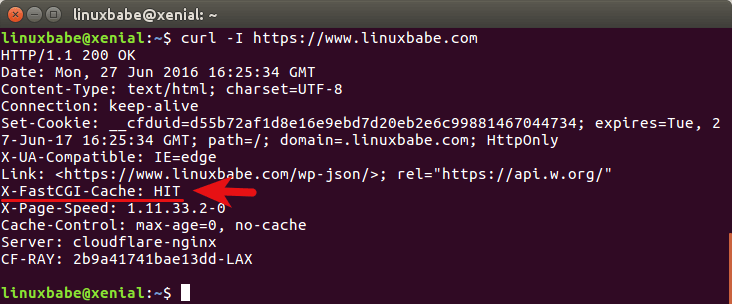
Take a look at the X-FastCGI-Cache header. HIT indicates the response was served from cache.
Stuff that Should not be Cached
Login session, user cookie, POST request, query string, WordPress back-end, site map, feeds and comment author should not be cached. To disable caching for the above items, edit your server block configuration file (Or directly in tinycp Web >> domain >> your domain >>custom config ). Paste the following code into the server context, above the location ~ \.php$ line.
set $skip_cache 0;

# POST requests and urls with a query string should always go to PHP
if ($request_method = POST) {
    set $skip_cache 1;
}
if ($query_string != "") {
    set $skip_cache 1;
}

# Don't cache uris containing the following segments
if ($request_uri ~* "/wp-admin/|/xmlrpc.php|wp-.*.php|^/feed/*|/tag/.*/feed/*|index.php|/.*sitemap.*\.(xml|xsl)") {
    set $skip_cache 1;
}

# Don't use the cache for logged in users or recent commenters
if ($http_cookie ~* "comment_author|wordpress_[a-f0-9]+|wp-postpass|wordpress_no_cache|wordpress_logged_in") {
    set $skip_cache 1;
}
Save and close the file. Then test Nginx configurations.
sudo nginx -t
If the test is successful, reload Nginx.
sudo systemctl reload nginx

Now its done
Tuesday, 22 September 2020
रॉबर्ट कियोसाकी यांचा श्रीमंतीचा मंत्र
- तुमचे यश हे तुमच्या इच्छा आकांक्षांवर तसेच तुम्ही जीवनात पाहिलेल्या मोठ्या स्वप्नांवरच नेहमी अवलंबून असते
- आपल्याकडील मालमत्ता आणि आपली जबाबदारी या दोहोंतला फरक ज्यावेळी आपल्याला कळतो, तेव्हाच खरे शहाणपण येते. आपल्या मालमत्तेकडून आपल्याला या ना त्या प्रकारे पैसा मिळतच असतो, तर आपल्याला आपल्या जबाबदारीसाठी पैसा हा खर्च करावाच लागतो. श्रीमंत माणसाला या दोहोंतला फरक चांगल्यापैकी कळलेला असतो
- पैशासाठी काम करू नका, तर स्वतःसाठी काम करा. आपला विकास साधा. विकासाच्या वाटेवर पैसा हा आपोआपच आपल्या मागे येत राहतो
- तुम्ही आज जे काही करणार आहात त्यावरच तुमचा उद्या म्हणजेच तुमचे उज्ज्वल भविष्य उभे राहणार आहे.
- आपल्याला आजवर जे सल्ले मिळाले ते पैसे वाचावा, कर्जातून मुक्त व्हा, दीर्घ गुंतवणूक करा, तसेच काही पैसे गोरगरिबांना द्या ई. तुम्हाला जर श्रीमंत व्हायचे असेल तर या सर्वांकडे दुर्लक्ष करायला शिका.
- व्यवसायातील कंपनीची स्थिती-गती, म्हणजेच कंपनीची मालमत्ता आणि नफा, या दोन गोष्टी सर्वार्थाने महत्वाच्या असतात. श्रीमंत माणूस हा एकूण मालमत्तेच्या हिशोबात बोलत असतो, तर गरीब माणूस रोजच्या नफ्यात अडकलेला असतो. एकूणच दोघांची प्रकृती, पिंड आणि स्वभाव वेगवेगळा असतो, आणि आयुष्याच्या मागण्याही.
- पैसे मिळविण्याची प्रक्रिया तीन दिशांची असते. प्रथम तुम्हाला पैसा कसा मिळवावा हे कळायला हवे, मग तुम्हाला त्याची व्यवस्था नीट लावता यायला हवी, आणि मुख्य म्हणजे तुम्हाला त्यातील काही पैशांची बचतही करता आली पाहिजे.
- तुमचे मन हे तुमचे मोठे भांडवल आहे, त्यात योग्य विचारांचीच भरती करा. योग्य ठिकाणी योग्य विचार तुम्हाला करता आला पाहिजे.
- तुम्हाला ज्याची भीती वाटते किंवा ज्याविषयी तुम्ही विलक्षण साशंक आहात अशांना स्वच्छ मानाने मोकळेपणाने भेटा
- जे काही करायचे ते आज करा, उद्या नको. विजेते नेहमीच आज हा शब्द वापरतात आणि झटपट कृती करतात पण जे पराभूत असतात वा भीतीग्रस्त असतात ते नेहमीच उद्या या शब्दाला अपार महत्व देतात.
- मोठी-महान स्वप्ने पाहायला विसरू नका. विचार करताना दीर्घ काळाचा विचार करा, आणि त्यासाठी पहिले पाऊल आजच उचला. पावलापावलांनी पुढे जात रहा, तुमच्या छोट्या छोट्या कृतीच तुम्हाला मोठे यश मिळवून देणार आहेत.
- बहुतेक लोक श्रीमंत होऊ शकत नाहीत कारण आपल्या समोर जी मोठी संधी उभी आहे, ती ओळखण्यासाठी ते पुरेसे प्रशिक्षित झालेले नसतात. श्रीमंत मात्र जीवनात भेटणाऱ्या प्रत्येक संधीचा क्षणाचा लाभ उठवतात. इतकेच नव्हे तर ते काही क्षणात संधी निर्माण करतात.
- काळ बदलत असतो, आपल्या अवतीभोवतीही खूप बदल होत असतात. पण हे बदल एकतर आपल्याला दिसत नाहीत किंवा ते आपल्या मुठीत पकडता येत नाही. आपण या बदलांना प्रवाही वृत्तीने सामोरे जायला हवे. तरच प्रगती शक्य आहे.
- योग्य व नेमके नेतृत्व हे आज आवश्यकच नाही तर अपरिहार्य झाले आहे. कुशल नेतृत्वाअभावी काहीच शक्य नाही. अगदी रोजचे प्रोडक्शनही. आज अनेक कारखाने बंद पडले आहेत ते केवळ कुशल नेतृत्वाच्या अभावीच. असे अकुशल नेतृत्व हे आपल्या अपयशाचे खापर नेहमीच दुसऱ्याच्या डोक्यावर थापत असते.
- श्रीमंत आणि गरीब माणूस दोघेही वेळेचा वेगवेगळा वापर करतात. जो माणूस अत्यंत गरीब, अस्वस्थ तसेच अत्यंत दुःखही असतो तो नेहमीच उद्या या शब्दाचा वारंवार वापर करतो. कारण तो आज खऱ्या अर्थाने जगात नसतो. तो नेहमीच उद्यात जगात असतो. कारण या उद्याच्या त्याची अशा लपलेली असते.
- श्रीमंत होण्याचा सर्वात चांगला मार्ग म्हणजे व्यवसायिक व्हा. व्यवसाय सुरु केल्यानंतर भक्कम कॅशफ्लो उभा राहिला कि त्यानंतर इतर मालमत्तेत गुंतवणूक सुरु करा
- तुम्ही पैशासाठी काम करण्याऐवजी पैसा तुमच्यासाठी काम कसा करेल, हे शिका
- विचार करणं हे सर्वात कठीण काम आहे, म्हणून फार थोडे लोक विचार करतात
- तुम्हाला तुमच्याकडची कौशल्य श्रीमंत बनवतात, पुस्तकी ज्ञान नाही
- आपण सारे जन्मजात विक्रेते असतो
- विक्री करता येणे हे धंद्यातले प्रथम क्रमांकाचे कौशल्य आहे
- मी नाकारलं जाण्याची जेवढी जोखीम घेईल तेवढाच मी स्वीकारला जाण्याची शक्यता जास्त असते
- स्थावर मालमत्ता हि विकण्यासाठी विकत घ्यायची नसते. उत्पन्न निर्माण करणारी मालमत्ता उभारण्यासाठी स्थावर मालमत्ता विकत घ्यायची असते
- तुम्हाला कायम उत्पन्न देत राहतील अशा संपत्ती निर्माण करा.
Sunday, 2 August 2020
व्यवसायातील अर्थगणित
१. तुमच्या व्यवसायातुन तुमचा स्वतःचा पगार वजा करता नफ्याच्या रुपात काही शिल्लक रहात असेल तर तुम्ही व्यवसाय करत आहात, जर पगार वजा जाता काहीच शिल्लक रहात नसेल तर तुम्ही स्वयंरोजगारात आहात... जर सगळ्यांची देणी देऊन तुम्हाला तुमचा पगार सुद्धा निघत नसले तर तुम्ही स्वयंरोजगारातही नसून, फक्त मजुरी करत आहात असा अर्थ निघतो...
२. जर पगार वजा जाता काही शिल्लक रहात असेल पण तो नफा व्यवसायातील गुंतवणुकीवर १२% प्रतिवर्ष व्याज पकडुन तीन वर्षात गुंतवणुक वसुल करण्यासाठी कमी पडत असेल तर तुमचा व्यवसाय टेक्नीकली तोट्यात चालला आहे असे समजावे. सोप्या आकडेवारीत सांगायचं म्हटलं तर महीन्याला गुंतवणुकीच्या 3.80-४% उत्पन्न निव्वळ नफा म्हणुन हाती आले पाहीजे.
३. जर तुमचा व्यवसाय ३ वर्षांपेक्षा जुना असेल, गुंतवणुक वसुल झालेली असेल, किंवा पारंपारीक व्यवसाय असेल, तर अशावेळी तो सेटअप उभा करण्यासाठी आज किती खर्च येऊ शकतो याचा अंदाज घेऊन त्यानुसार महीन्याला किमान किती उत्पन्न मिळाले पाहीजे याचा हिशेब करु शकता. अशा प्रकारात त्या अंदाजे गुंतवणुकीच्या किमान २% निव्वळ उत्पन्न महिन्याला हाती आले पाहिजे. जर व्यवसायाची उलाढाल प्रत्येक महिन्याला होणे शक्य नसेल, म्हणजे पेमेंट २-३ महिन्याला मिळत असतील किंवा वर्षातून काही महिने जास्त आणि काही महिने कमी उलाढालीचे असतील तर ३-६-९ महिन्यांच्या किंवा अगदी वर्षभराच्या उलाढालीच्या व उत्पन्नाच्या हिशोबाची सरासरी काढावी.
४. महीन्याला किती उत्पन्न मिळेल याचा विचार करुन व्यवसाय सुरु करायचा नसतो, मार्केटमधे कशाची गरज आहे, आपल्याा काय जमू शकतं, आपल्या अवाक्यात काय आहे हे पाहूनच व्यवसाय सुरु करायचा असतो. व्यवसायात कोणत्याही फिक्स उत्पन्नाची अपेक्षा ठेऊ नये, दोन सारखाच व्यवसाय करणाऱ्या आणि सारखेच सेटअप असणाऱ्या व्यावसायिकांचे उत्पन्न वेगवेगळेच असते. पण तुम्ही जी गुंतवणुक करत आहात तीच्या प्रमाणात किमान उत्पन्न आले पाहिजे असा तुमचा प्रयत्न असायलाच हवा.
व्यवसायातून उत्पन्न मिळतंच असतं. व्यवसाय विनाउत्पन्नाचा नसतो. त्यामुळे जी गोष्ट व्यवसायाचा अविभाज्य भाग आहे तिचे प्रमाण जाणून घेण्याची गरज नसते. उत्पन्नाचे प्रमाण हे नेहमीच उलाढालीवर आणि ग्राहकांवर ठरत असते..
गुंतवणुकीच्या प्रमाणात किमान किती उत्पन्न मिळायला हवे आणि महीन्याला किती मिळतील हा प्रश्न या दोन वेगवेगळ्या बाबी आहेत. पहिला प्रश्न टेकनीकल आणि आकडेवारीवर अधारीत आहे तर दुसरा प्रश्न व्यवसायात यायचंय पण नोकरीप्रमाणे फिक्स उत्पन्न पाहिजे असा मानसिकतेचा आहे.
(यासंबंधी 'व्यवसायातील अर्थशास्त्र' या नावाने काही महिन्यांपूर्वी काही स्लाईड्स पब्लिश केलेल्या आहेत, त्यातही बरीच सविस्तर माहिती दिलेली आहे.)
व्यवसाय साक्षर व्हा...
Monday, 27 July 2020
Wordpress Required PHP Extensions
Following are extensions required by wordpress,
php-curlphp-gdphp-intlphp-mbstringphp-soapphp-xmlphp-xmlrpcphp-zip
Install PHP 7.4 php-fpm on Ubuntu and Debian
Start with adding the repository kindly provided by sury.org
Update your package list
Install the PHP 7.4 packages for nginx and php-fpm functionality
Now we can update the PHP command line binary shorthand php to use the PHP 7.4 CLI binary.
Subscribe to:
Posts (Atom)